

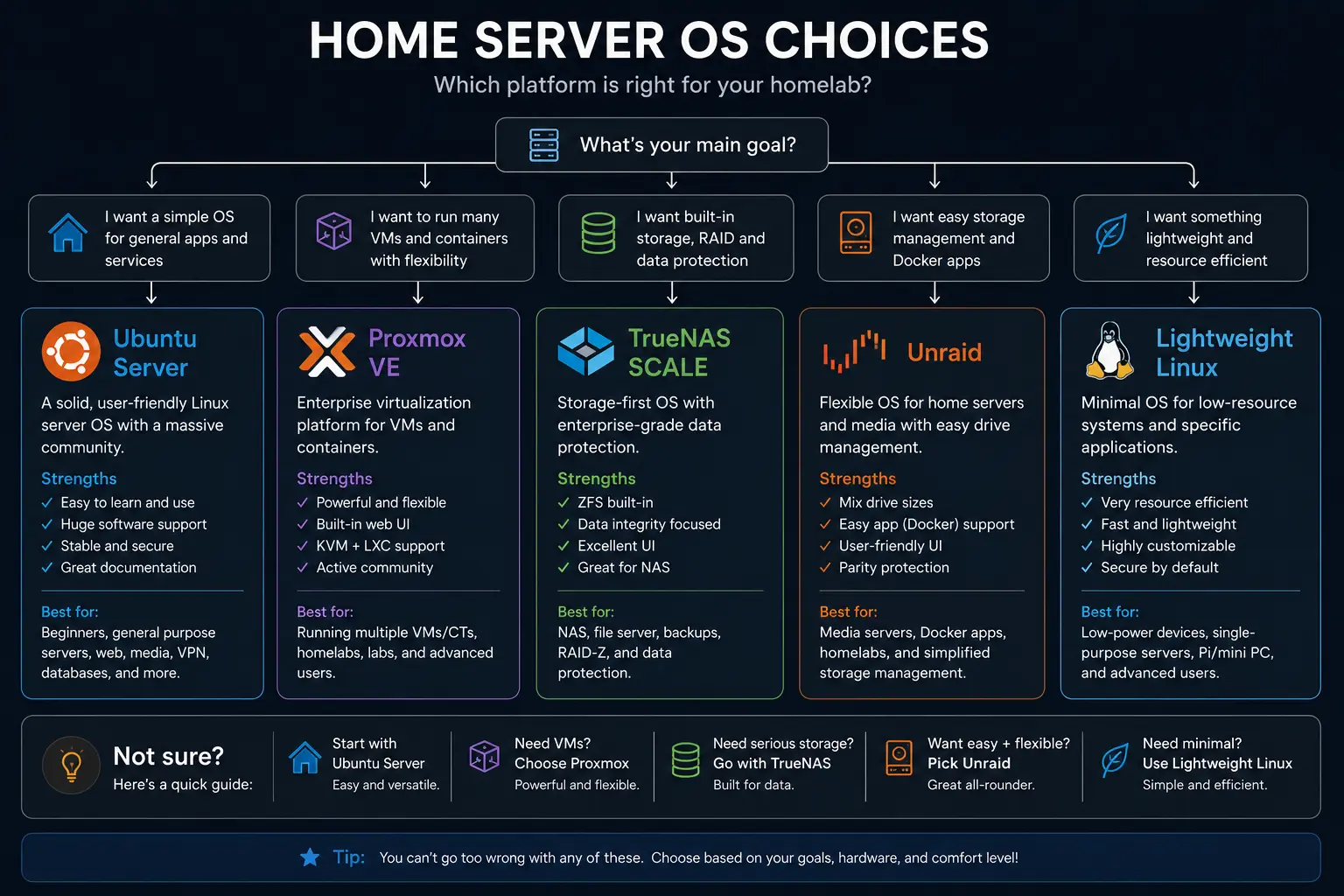

Quick answer
What this guide helps you do
A practical comparison of Proxmox, plain Linux, and NAS-focused distros for small, low-power homelabs.
Goal
Pick an OS layout that fits how you think, not what Reddit is shouting about:
- Proxmox (hypervisor-first)
- Plain Linux (services on one OS)
- NAS-focused distros (TrueNAS, etc.)
We’ll focus on small, low-power homelabs – not 8-node clusters.
1. Option A: Proxmox as the base
For new SmallGrid Proxmox work, Proxmox VE 9.2 is the current reference baseline. Older 8.x layouts remain valid concepts, but repository commands, kernel assumptions, passthrough guidance and screenshots must be checked against 9.2.
Best for:
- You like the idea of VMs and containers
- You want clean separation of “host” vs “services”
- You might move workloads to a different box later
Pattern:
- Proxmox host: boring hypervisor
- VM #1: “core services” (Docker stack)
- Optional VM/CTs: experiments, separate services
Pros:
- Easy backups of whole VMs / CTs
- Snapshots before upgrades
- Clear separation between “infrastructure” and “apps”
Cons:
- Slightly more complexity to learn
- Needs a bit more RAM than the absolute minimum
2. Option B: Plain Linux (bare metal services)
For new Ubuntu Server builds, Ubuntu 26.04.1 LTS is the current SmallGrid reference install image for the 26.04 series. Ubuntu 24.04 LTS remains supported and should not be replaced purely to chase a version number when the existing procedure still works.
If you are moving an existing home server from 24.04, use the dedicated Ubuntu 26.04.1 home-server upgrade guide rather than treating a release upgrade like a fresh install.
Best for:
- You want one OS to manage
- You’re happy to run:
- Docker
- or system services directly
- You don’t care about migrating VMs between hosts
Pattern:
- Debian / Ubuntu Server
- Docker + docker-compose for most apps
- Systemd services for anything else you like
Pros:
- Simple mental model
- No hypervisor layer
- Great for single low-power box
Cons:
- OS and apps are more tangled
- Backups are at the “folders and configs” level, not whole VMs
- Experimenting can feel riskier if you get too wild on the main OS
3. Option C: NAS-first (TrueNAS, OMV, etc.)
Best for:
- Your main goal is storage:
- ZFS, snapshots, SMB/NFS
- You want a nice web UI for disks and shares
- Apps are secondary
Pattern:
- TrueNAS / OMV as the main OS
- Apps run as:
- built-in “apps” / plugins
- Docker (depending on distro)
Pros:
- Very good at managing multiple disks
- Snapshots, replication, scrubs built-in
- Nice UI for disks and shares
Cons:
- App ecosystem varies
- Not as flexible as plain Linux or Proxmox for “weird stuff”
- Can feel heavy for tiny “1 or 2 disk” setups
4. How to choose for a SmallGrid-style homelab
Ask:
- Is running multiple OSes (VMs) important to me?
- Is storage the main event, or just “I need somewhere to put media”?
- How much complexity do I want to carry around in my head?
Rough guidance:
- If you want flexibility + neat separation:
- Proxmox
- If you want minimum layers:
- Debian / Ubuntu bare metal
- If your primary concern is RAID/ZFS + shares:
- NAS distro (TrueNAS, OMV)
5. Example layouts
Example 1: Proxmox + services VM
- Proxmox host on SSD
- VM: Ubuntu Server
- Docker: Jellyfin, Pi-hole, Syncthing, etc.
- Backup:
- Proxmox VM backups to external disk
This is the “one-node Proxmox for normal humans” pattern.
Example 2: Plain Ubuntu server
- Ubuntu Server on SSD
/mnt/mediaon HDD- Docker stack:
- Jellyfin
- AdGuard
- Syncthing
- whatever else
Backups via rsync / restic of config + media.
Example 3: TrueNAS as main OS
- ZFS pool with 2–4 drives
- SMB shares for media and files
- Apps:
- Jellyfin as an app / container
- Backup tools inside the TrueNAS ecosystem
Great if storage is your real focus.
6. Changing your mind later
You can move between options:
- From plain Linux → Proxmox:
- turn the old server into a VM inside Proxmox (P2V)
- From Proxmox → plain Linux:
- create a new VM or bare-metal box and migrate containers/services
- From NAS distro → something else:
- export data, build new box, rsync over
Don’t over-optimise for the ultimate future state. Pick what you’re happy to live with for the next 1–2 years.
7. Recap: SmallGrid OS rule
- Choose the OS that matches how you think, not just what’s fashionable.
- Extra layers are only worth it if they unlock something you’ll actually use.
- A “boring” layout that you understand always beats a clever one you don’t.