


Quick answer
What this guide helps you do
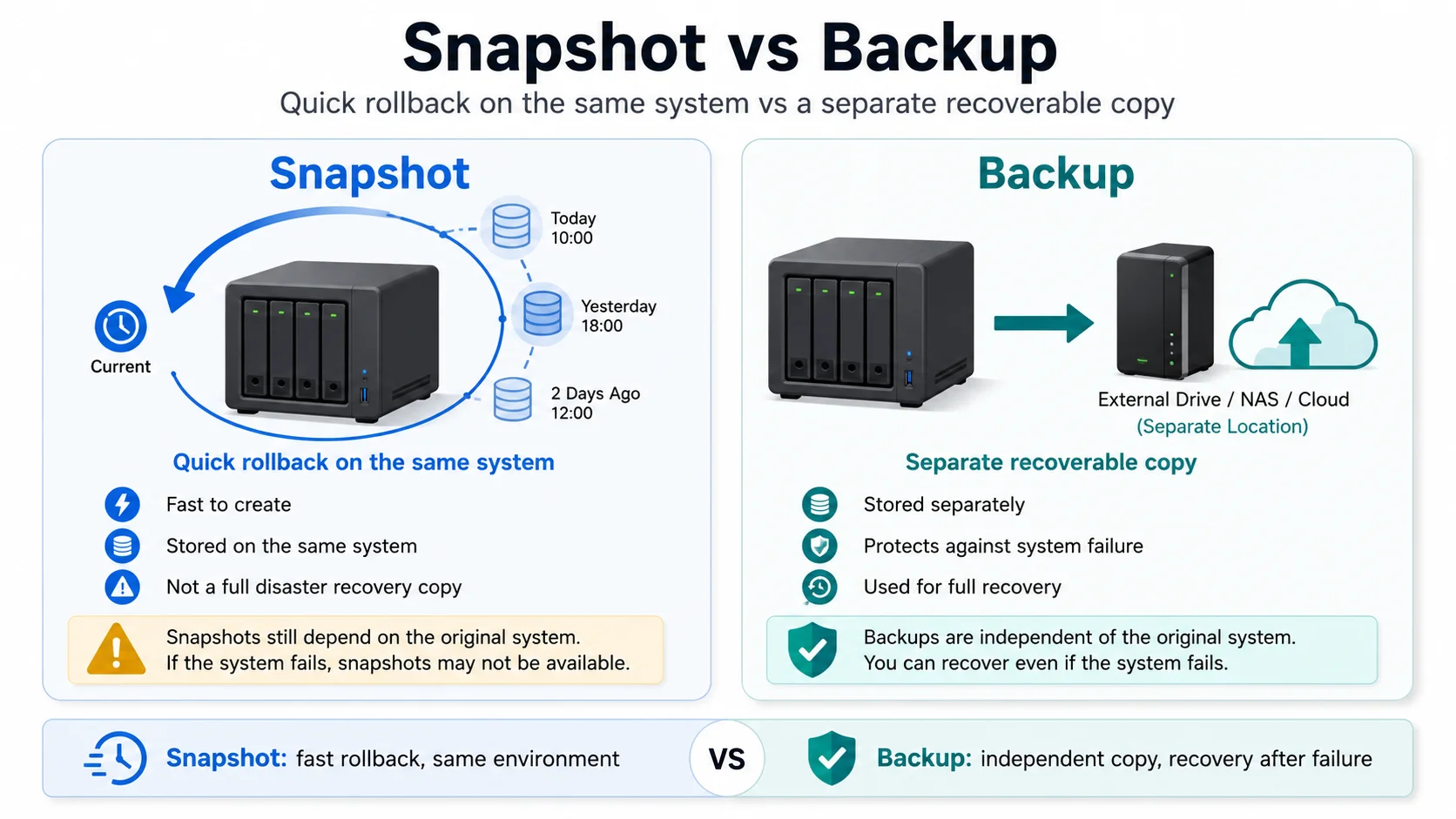
Understand the difference between Proxmox snapshots and backups, when to use each one, and why snapshots are not a recovery plan on their own.
Goal
Understand the difference between Proxmox snapshots and Proxmox backups.
They sound similar, but they solve different problems:
- snapshots help you roll back a recent change
- backups help you recover when something bigger goes wrong
The beginner mistake is treating snapshots as if they are backups.
They are not.
The default recommendation
Use both.
A sensible SmallGrid setup is:
Snapshot before risky changes
Backup every important VM or container automatically
Test restore before trusting the backup plan
Snapshots are fast and convenient. Backups are what save you when the host, disk, VM, or storage breaks.
Do not choose one. Use each for the job it is good at.
The short version
| Tool | Best for | Not for |
|---|---|---|
| Snapshot | Rolling back a recent change | Long-term recovery |
| Backup | Restoring after failure or deletion | Quick experimental rollback |
| Clone | Testing bigger changes safely | Replacing backups |
Snapshots are a short-term safety net.
Backups are a recovery plan.
Clones are for experiments.
What a Proxmox snapshot is
A snapshot captures the state of a VM or container at a point in time.
Use a snapshot before doing something risky, such as:
- package upgrades
- application upgrades
- config changes
- database changes
- network changes
- storage changes inside a VM
Example VM snapshot:
qm snapshot 100 pre-upgrade-2026-06-27Example container snapshot:
pct snapshot 101 pre-upgrade-2026-06-27If the change goes badly, you can roll back to the snapshot.
That is useful. It is not the same as having a backup.
What a Proxmox backup is
A backup creates a restorable copy of a VM or container.
In Proxmox, these are usually created with VZDump backup jobs.
A backup can be stored on:
- another local disk
- a NAS share
- external storage
- Proxmox Backup Server
- another backup target
The important part is that the backup should survive problems with the original VM or container.
A backup is what you use when:
- a VM is deleted
- a disk fails
- the host needs rebuilding
- an upgrade damages the system badly
- you need to restore to a different machine
For a practical backup setup, see Backups That Don’t Lie: 3-2-1 for Home Servers.
Why snapshots are not backups
Snapshots usually depend on the same storage as the VM or container.
That means if the underlying disk or storage pool fails, the snapshot may fail with it.
A snapshot also grows and changes as the original VM keeps running. It is not a clean, independent copy stored somewhere else.
This is the key point:
If the storage holding the VM dies, a snapshot on that same storage is not a recovery plan.Snapshots are excellent for undoing a bad change.
They are poor protection against bigger failures.
When to use snapshots
Use snapshots before short-term changes where you might need a quick rollback.
Good snapshot moments:
- before an application upgrade
- before editing important config
- before changing networking
- before changing Docker Compose files
- before testing a new package
- before changing storage inside the guest
Example naming pattern:
pre-upgrade-2026-06-27
pre-network-change-2026-06-27
pre-jellyfin-upgrade-2026-06-27
Keep names boring and obvious.
Future you should know why the snapshot exists.
When to use backups
Use backups for anything you would not want to rebuild manually.
Back up:
- core services VMs
- important LXC containers
- databases
- Docker hosts
- Home Assistant
- Jellyfin config and metadata if you care about it
- anything with personal data or difficult setup work
A basic Proxmox backup job should run automatically.
A good starting schedule is:
Daily backup for core services
Weekly or monthly retention depending on storage space
Occasional restore tests
The exact schedule matters less than having one that actually runs.
When to use clones
Use a clone when you want to test something bigger without touching the working VM or container.
Good clone use cases:
- major application version upgrades
- changing a database backend
- replacing a service
- testing a new operating system version
- restructuring Docker volumes
A clone is more useful than a snapshot when you want to test for longer or make several changes.
Example approach:
Clone core-services to core-services-test
Give the clone a different IP address
Test the change
Delete the clone when finished
Apply the change to the real VM later
For more experiment workflows, see Safe Experiments: Snapshots and Test Environments for Your Homelab.
A sensible Proxmox workflow
Before a small risky change:
Take snapshot
Make change
Test service
Rollback if needed
Remove snapshot once happy
Before a bigger change:
Take backup
Clone VM or container
Test change on clone
Apply to real service later
Keep backup until confirmed stable
For routine protection:
Automated backup job
Backup stored away from the main VM storage
Regular restore test
Short-lived snapshots only
This keeps snapshots, backups, and clones in their proper lanes.
How long should you keep snapshots?
Not forever.
Snapshots are temporary.
A practical rule:
Keep snapshots for hours or days, not months.Remove old snapshots once:
- the upgrade is confirmed stable
- the config change is working
- the VM has been backed up
- you no longer remember why the snapshot exists
Old snapshots can consume storage and make the system harder to understand.
How many backups should you keep?
This depends on disk space and how important the service is.
A simple starter retention plan:
Keep 7 daily backups
Keep 4 weekly backups
Keep 3 monthly backups for important systems
For small homelabs, even this may be more than you need.
The most important thing is not a perfect retention policy. It is knowing that at least one recent backup can restore successfully.
Restore testing matters
Backups are only real after a restore test.
A safe test pattern:
- Pick a small VM or container.
- Restore it to a different ID.
- Boot the restored copy.
- Confirm the service starts.
- Delete the test restore when finished.
Do not overwrite the live VM during a test.
Restore to a different ID so the test is safe.
Common beginner mistakes
Keeping snapshots for months
Snapshots are not an archive.
If you want history, use backups.
Taking snapshots but no backups
This only protects you from some mistakes.
It does not protect you from larger storage or host problems.
Never testing restore
A backup job can appear successful but still fail when you need it.
Test restore before trusting it.
Backing up to the same disk only
A backup stored on the same physical disk as the VM is better than nothing, but it is not enough.
Try to keep at least one useful copy somewhere else.
Snapshotting instead of cloning
For large experiments, clone the VM or container.
A snapshot is for rollback. A clone is for testing without touching the original.
SmallGrid rule
Use this rule:
Snapshot before change.
Backup before loss.
Clone before experiments.
Restore test before trust.
That one sentence prevents most beginner backup mistakes.
Next steps
Useful related guides:
- Proxmox for Normal Humans: One-Node Starter Setup
- Backups That Don’t Lie: 3-2-1 for Home Servers
- Safe Experiments: Snapshots and Test Environments for Your Homelab
- Mini PCs Under £200: Picking a Tiny Box That Can Actually Homelab
- How to Measure Homelab Power Usage Properly
Recap
Snapshots and backups are not the same thing.
Use snapshots to roll back recent changes.
Use backups to recover when something bigger goes wrong.
Use clones to test bigger experiments safely.
A small Proxmox homelab becomes much easier to manage when each tool has a clear job.